
Scan your website for free.
Prove it is yours first.
Enter your domain, then the one-time code we send to an email address at that domain. Only then do we run a 3-minute automated scan and email you the PDF report.
How it works
We only scan a site when the person asking can receive email at it.
That is the whole authorization model, so it comes first. Nobody can point this scanner at a site they do not speak for.
- 01
Enter the domain and an email address at it
For example.com, [email protected] or [email protected] works. An address anywhere else, including Gmail or Outlook, is refused.
- 02
Enter the 6-digit code we send there
The code expires after 15 minutes, and three wrong entries cancel it. Receiving it is your proof that you speak for the site.
- 03
The scan is queued
Only once the code checks out does the scan go into the queue. Its web requests carry a header (X-Scanner-Authorized-By) naming the address that authorized it, so the traffic is easy to identify in your logs.
- 04
The report arrives by email
The scan stops after 3 minutes at most. The PDF report goes to the same address when it finishes, with the finding counts in the email itself.
What it checks
A fixed, light scan profile, capped at 3 minutes.
Whatever finishes inside the 3 minutes is in the report. The checks come in two kinds.
Reading what your site already serves
- Security headers, CORS policy and clickjacking protection, on up to 80 distinct paths.
- TLS protocol versions and cipher suites on the TLS ports it finds open.
- Technology fingerprinting (web server, framework, CMS) and matching against known CVEs. On WordPress, Drupal or Joomla, a version and plugin check against a list of known vulnerabilities.
- About 140 paths that should never be public, such as .git/, .env files, backup archives and database dumps.
- JavaScript files found while crawling, checked for exposed API keys and other secrets.
Active probes, kept light
- A connection check of the 100 most common TCP ports on the main host.
- A crawl of up to 100 pages.
- URL parameters found in the crawl are tested with single-request probes for error-based and boolean-based SQL injection, reflected cross-site scripting and open redirects. These are GET requests carrying test strings: the scan reads how the page responds. It does not submit forms or log in, and command-injection, path-traversal and time-based SQL injection probes are not run.
- Up to 20 critical-severity community detection templates (ProjectDiscovery's open-source nuclei-templates), chosen to match the technology it found. Templates tagged as denial-of-service are excluded.
Published API specs: read-only
If your site publishes an OpenAPI or Swagger file at a standard path (such as /openapi.json or /swagger.json), the scan tests the read-only routes that file lists. It never sends POST, PUT, PATCH or DELETE requests to your API, so it can't create, change or delete your data.
Left out of the free scan
Form submission, logged-in testing, subdomain discovery, stored and DOM-based cross-site scripting, request smuggling, race conditions and access-control testing. Those need more time and, usually, a conversation about scope.
What you get
A PDF report, emailed to the address you verified.
- 01
Cover
The target, the date, finding counts by severity and a one-line verdict.
- 02
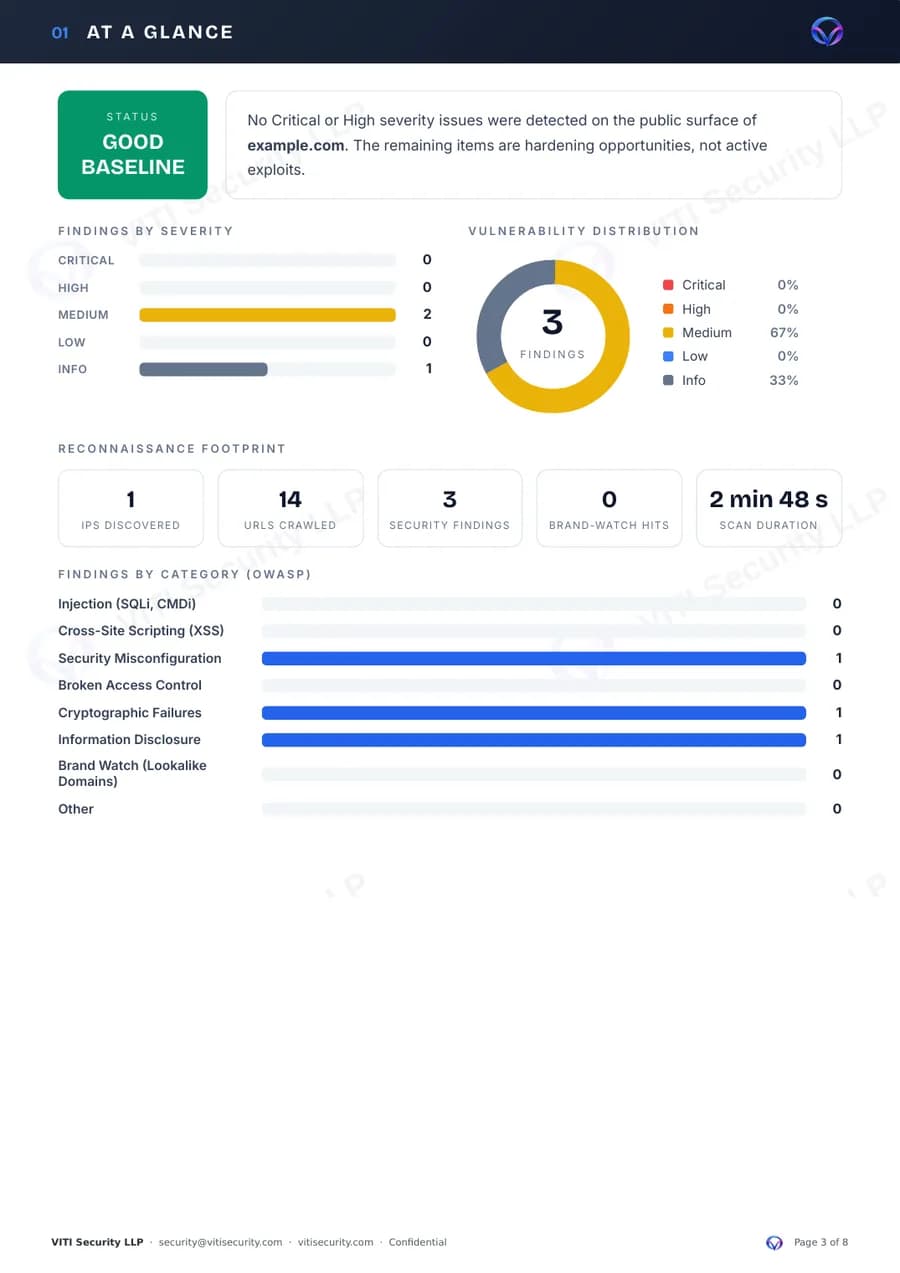
At a glance
Overall status, findings by severity and by category, and how many IP addresses and URLs the scan saw.
- 03
Executive summary
What was found in plain language, checks that passed, what the scan does not cover, and the scan settings (unauthenticated, free tier).
- 04
Discovered assets
Up to 5 IP addresses and 12 crawled URLs.
- 05
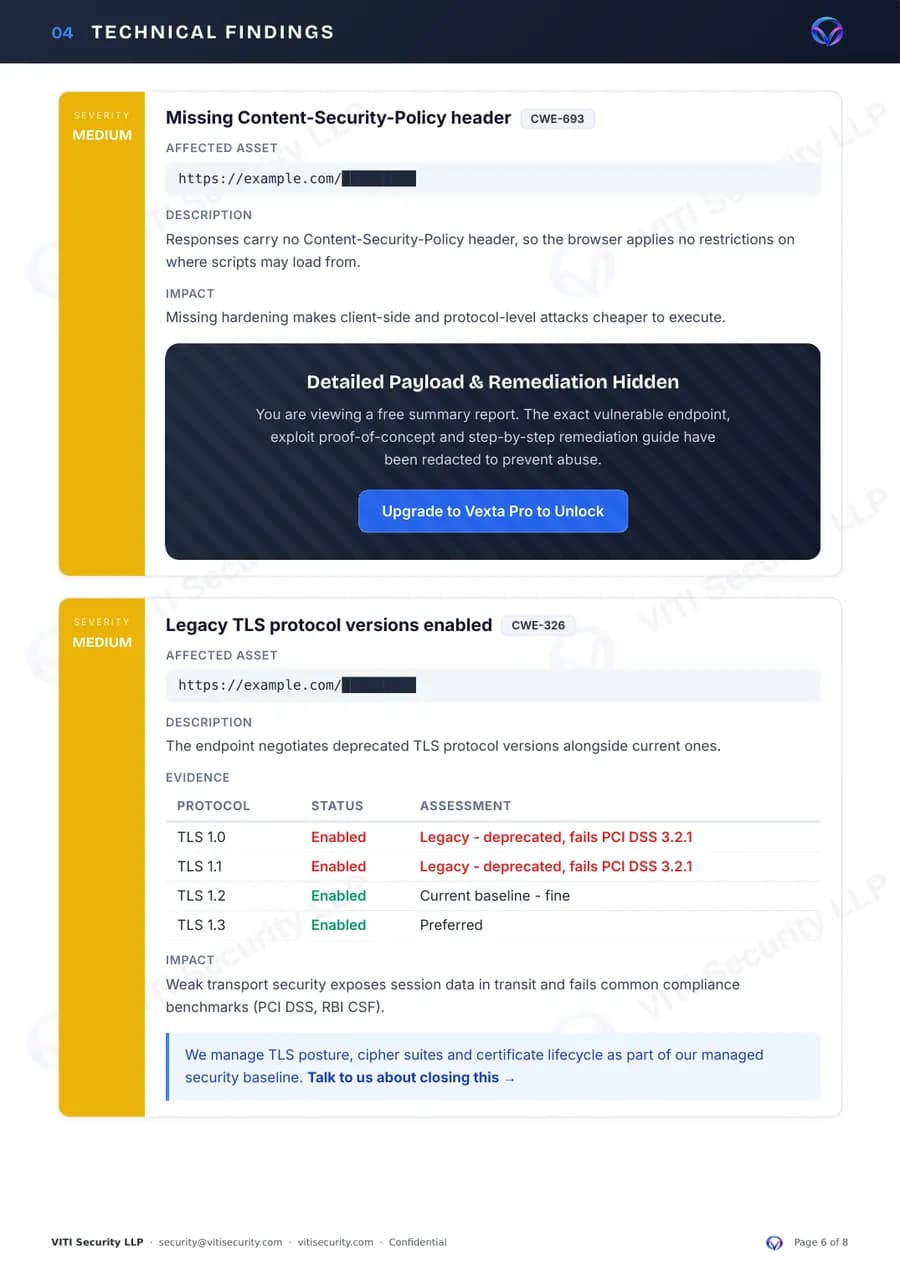
Technical findings
Each finding with its severity, CWE and CVSS where known, a description and the impact.
- 06
Brand watch
Only if the scan spotted lookalike domains registered by someone else.
- 07
Summary and next steps
Scope, disclaimer and how to reach an engineer about the results.
What is redacted, and why
For Critical, High and Medium findings, the exact vulnerable endpoint, the proof-of-concept and the step-by-step fix are left out of the free report, and affected URLs are masked on every finding. If the email ends up in the wrong inbox, it is not a map for an attacker. Running Vexta yourself, or a VAPT engagement, gives you the full detail.
What it is not
A quick outside look, not an assessment.
Not a penetration test
A penetration test has a person working your application, logged in, for days: business logic, chained bugs, manual proof. This is a 3-minute automated pass over the public surface.
See VAPT →Not a full Vexta scan
Vexta on your own machine runs the deeper scan profiles, logged-in scanning on Pro and Enterprise, and keeps the full, unredacted results.
Try Vexta free →Not monitoring
It is a point-in-time snapshot. Watching your external footprint for changes is a different service.
See attack surface management →